Many merchants connect Xendit, copy an API key, and assume checkout is ready to go. Then a live payment fails, a webhook goes unanswered, or a payout gets rejected, and the cause is not obvious. These problems usually trace back to a handful of setup mistakes made in the first hour of integration. This guide walks through the common Xendit setup mistakes that break payments, along with the fix for each one.
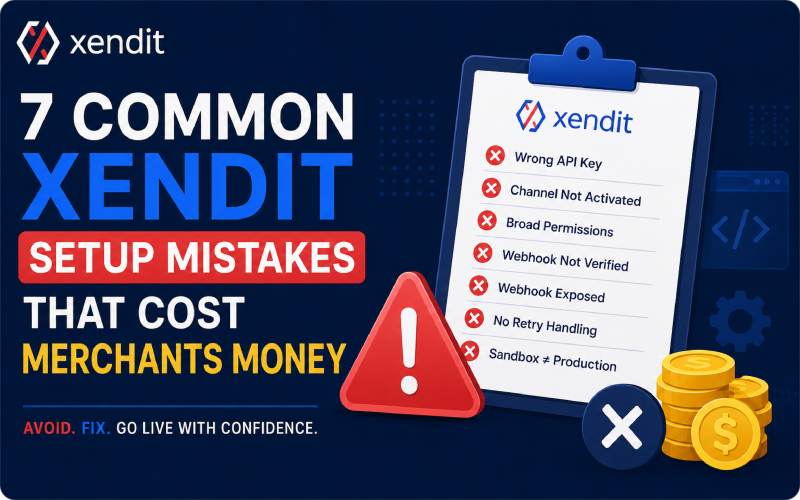
1. Mixing Up Test and Live API Keys
Xendit issues separate credentials for test mode and live mode, and swapping one for the other is one of the easiest setup mistakes to make. Test keys route requests to the sandbox, so no real money moves and payment behavior stays predictable. Live keys route requests to production, where a payment channel might not yet be turned on. A team that deploys with a test key still hardcoded will see checkout appear to work while no funds are ever captured. A team that deploys with the wrong live key can see requests fail outright. Store both keys in separate environment variables, label them clearly, and confirm which mode the dashboard toggle shows before testing anything.
2. Skipping Payment Channel Activation Before Going Live
Test mode gives access to every payment channel by default, which hides a problem that only shows up in production. Before an account can accept real transactions through a channel such as a virtual account, e-wallet, or card, that channel must be marked as activated inside the dashboard. Some channels turn on automatically, while others need document submission and partner approval that can take several days. A merchant who tests thoroughly in sandbox and then launches without checking channel status will see live requests or payment links fail for methods that were never approved for production. Check the Payment Channels page before any go-live date, and file activation requests early since approval timelines vary by channel and partner.
3. Setting API Key Permissions Too Broad
Every Xendit API key can be scoped to read, write, or no access for each product area, and many merchants generate one key with full write access to every product for convenience. That habit turns a single leaked key into full control over invoices, disbursements, and balance data. A cleaner approach is to create one key per integration point, grant write access only where the integration actually creates or updates data, and set unused products to no access. This also makes it easier to trace which part of a system is responsible when something breaks, since each key maps to one purpose instead of everything at once.
4. Skipping Webhook Signature Verification
Xendit signs every webhook event with a token in the request header. The token helps your server confirm that Xendit sent the event. Many merchants accept webhook requests without checking the token first. This mistake lets attackers send fake payment confirmations to your system. Fake confirmations can trigger order fulfillment without any real payment. Store the verification token on your server, never in client-side code. Compare the incoming token with your stored token during every request. Reject requests with mismatched tokens before processing order or payout data.
5. Exposing the Webhook Endpoint on the Client
Some integrations accidentally reveal the webhook URL inside frontend code, a public repository, or a client-side network request. Once that URL is visible, anyone can send requests to it and attempt to trigger false events. Webhook handling should live entirely on the server, never inside a browser or mobile app, and the endpoint address should stay out of public code and documentation. Restricting the URL to trusted personnel and, where available, adding IP allow-listing gives a second layer of protection beyond signature checking alone. For more upadates about games visit gamificationsummits
6. Not Planning for Retries and Duplicate Events
Xendit automatically retries webhook deliveries when servers fail to return success responses. These retries may continue several times over several hours. Poorly designed servers may process the same payment more than once. This mistake can send duplicate confirmation emails or credit account balances twice. Network delays can also deliver events in the wrong order. Systems that expect fixed sequences may then trigger incorrect actions. Track each event with a unique identifier. Check processed events before taking any action. Design fulfillment logic to handle events in any order..
7. Treating the Sandbox as a Full Rehearsal
Test mode is useful for confirming that requests are formatted correctly and that a server can receive callbacks, but it does not fully mirror production behavior. Channel availability, activation status, and certain partner restrictions only apply once an account is live. Teams that treat a clean sandbox run as proof the integration is finished sometimes discover on launch day that a channel needs manual activation, a webhook URL was never updated for the live environment, or permissions on the live key do not match the test key. Run a short checklist against the live dashboard right before launch, covering key mode, channel activation, webhook URL, and permission scopes, rather than assuming sandbox success guarantees a smooth production start.
Frequently Asked Questions
What happens if a live payment channel is not activated?
Any API request or payment link that uses that channel fails in production, even if the same request worked correctly in test mode.
How does Xendit verify that a webhook is genuine?
Xendit includes a signed token in a request header, and a server should compare it against a saved verification token before processing the event.
How many times does Xendit retry a failed webhook?
Xendit retries automatically for a period with exponential backoff when a server does not return a success status, so an endpoint should handle repeated deliveries of the same event without acting on it twice.

Julian Thorne is a distinguished Technical Strategist and Fintech Analyst with over 6 years of experience in digital payment architectures. Specializing in the integration of high-performance gateways like Xendit, he focuses on optimizing the intersection of gamification and online ticketing systems. Julian’s expertise lies in deconstructing complex payment flows and enhancing sales effectiveness through data-driven insights. His recent work deeply explores the evolution of digital event platforms in 2026, providing actionable strategies for global summits and large-scale ticketing infrastructures.
Learn more about our team OR Get in touch